About this guide
This guide will help you navigate Cashier V2, a powerful and user-friendly payment management solution designed to streamline your payment processes and maximize its features.
Objectives
- Walk you through the key functionality of Cashier V2.
- Break down complex processes into clear, step-by-step instructions.
- Help you efficiently manage tasks such as currency configuration, provider integration, transaction monitoring, and more.
- Assist in setting up the system for the first time and optimizing existing workflows.
Intended audience
This guide is for individuals involved in payment operations, including the head of the department, senior payment managers, payment managers, and others responsible for payment tasks. It is designed to help these professionals configure Cashier V2 to meet their organization’s payment needs.
How to read this guide
This guide is designed as a user journey. If you're new to Cashier V2, follow the guide step-by-step. If you're already familiar with Cashier V2, you can choose which sections to follow based on the functionality you need to set up.
Glossary
| Abbreviation | Definition |
|---|---|
| APM (Alternative payment method) | Payment options in Cashier that do not involve card transactions. |
| PSP (Payment service provider) | The service provider responsible for processing card payments within Cashier. |
| RDP (Real deposit page) | The dedicated page where customers log in to make secure deposits. |
| FTD (First time deposit) | The first deposit made by a customer into their account. |
| RTD (Repeated time deposit) | Any deposit made after the first, indicating that the customer is returning. |
| DOD (Declaration of deposit) | A formal statement confirming that a deposit has been made. |
| BIN (Bank identification number) | The first digits on a payment card, which identify the bank that issued the card. |
| AML (Anti-money laundering) | Policies and procedures designed to prevent the misuse of payment systems for money laundering and related crimes. |
| Customer | The end-user who makes payments or deposits through Cashier. |
| User | A person who accesses and manages the Cashier back-office, such as an administrator or support staff. |
| 2D (2D payment gateway) | A basic payment gateway without advanced security layers. |
| 3DS (3D secure payment gateway) | An enhanced security protocol for processing card payments, providing an extra layer of authentication. |
| TRX (Transaction) | Any payment or deposit action processed through the system. |
| Payment provider | A financial partner within Cashier that supports both card (PSP) and alternative (APM) payment methods. |
| OTP (one-time password) | A unique code created for one-time authentication. |
| KYC (Know your customer) | A process to verify a client's identity, required for compliance and fraud prevention. |
What is Cashier V2?
Cashier V2 is a payment solution that empowers companies to efficiently manage and control their payment processes through a user-friendly and intuitive back-office interface. Whether you're tracking transactions or optimizing payment routes, Cashier V2 is designed to streamline your day-to-day operations.
Key features
-
Seamless payment provider integration
Connect to all supported payment providers and methods by simply selecting them from a list within the Cashier back-office interface.
-
Comprehensive transaction reporting
Easily search and access all transactions in a single report, utilizing Cashier’s advanced search bar and filters.
-
Optimized transaction routing
Improve approval rates and reduce commission fees by automatically routing transactions to the most suitable processor based on factors like BIN, currency, and location.
-
Effective risk management
Prevent high-risk transactions from reaching providers, boosting approval rates and saving on provider fees.
-
Real-time visual dashboards
View and analyze all payment data through a cohesive, real-time dashboard.
-
Advanced analytics
Gain detailed insights into customer actions, payment methods, and processes.
Before you start
To comply with PCI DSS requirements, Cashier360 uses Two-Factor Authentication (2FA) with Google Authenticator for all Cashier Backoffice logins.
The login process depends on the user’s status: Enrolled or Not Enrolled.
If the user is enrolled:
- Open the Cashier Backoffice.
- Log in using your email and password.
- When prompted, open the Google Authenticator app on your mobile device.
- Enter the One-Time Password (OTP) displayed in the app.
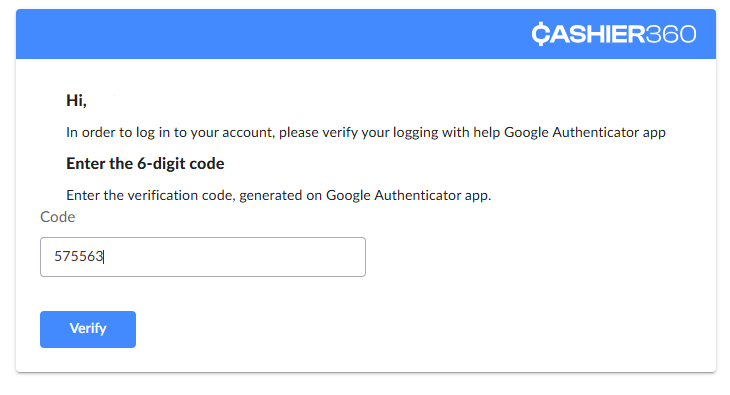
- After successful verification, you will be logged into the Backoffice.
If the user is not enrolled:
- Open the Cashier Backoffice.
- Log in using your email and password.
- The system will display the Google Authenticator enrollment screen.
- Follow the on-screen instructions to complete the enrollment.
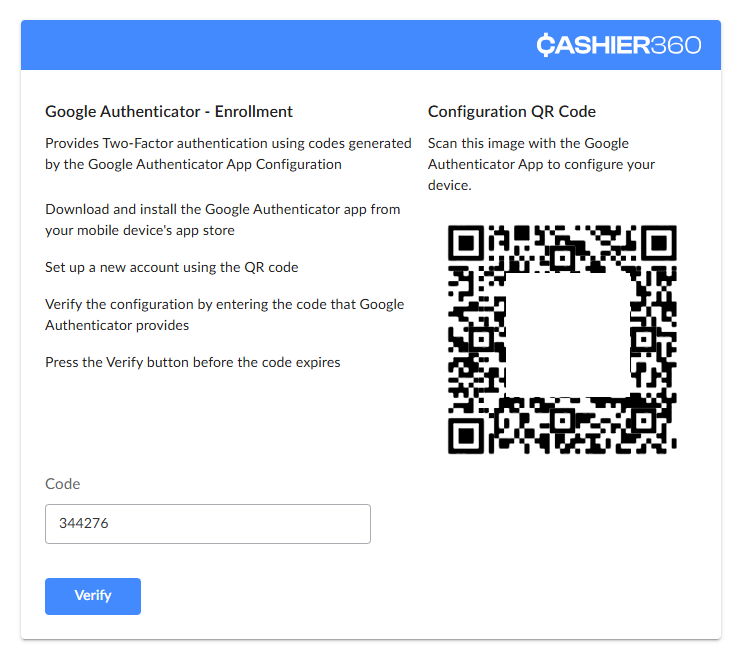
- Once enrolled, enter the One-Time Password (OTP) generated by Google Authenticator.
- After successful verification, you will be logged into the Backoffice.
You must have the Google Authenticator app installed on your mobile device before enrollment. Each OTP is valid for a short period; if it expires, use the next one displayed in the app.